
Work Tasks
The maintenance or work Tasks is an area that describes all work in the system that requires your input.
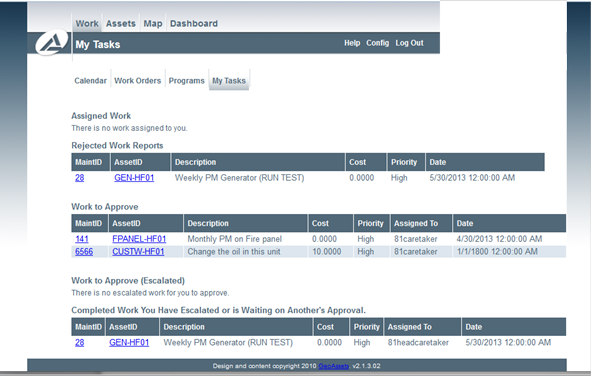
In each of the sections, left clicking on the MaintID will bring up the work report, right clicking will allow you to "View Maintenance" on the item. Left clicking on the AssetID will open the Asset information for that asset.
There are five (5) sections that are visible based on your responsibilities:
Assigned Work
This is work that has been assigned to you and that you are responsible to complete the work report for. This may include work that you do not necessarily have to execute, but have to ensure it is completed.
Rejected Work Reports
These are reports that you have completed, but were since rejected by the approver. These reports require modification and then you can resubmit.
Work to Approve
Work Reports in this area are completed reports that you have to approve or reject. These could have been reports completed by your direct subordinate or are reports where you were designated the approver.
Work to Approve (Escalated)
Work Reports in this area are reports that have been escalated to you by one of your subordinate approvers.
Completed Work you Have Escalated or is Waiting on Another's Approval
Any work that you have completed or approved (and not closed) will show up in this list until it is closed by an approver.