
Work - Maintenance - Table
The Maintenance Table View displays all the identified maintenance items required for all assets. If the maintenance activity has been scheduled, the table view will present this information. This view also provides other related details, including the maintenance task priority, the estimated cost of the work, and a brief description of the maintenance that is required.
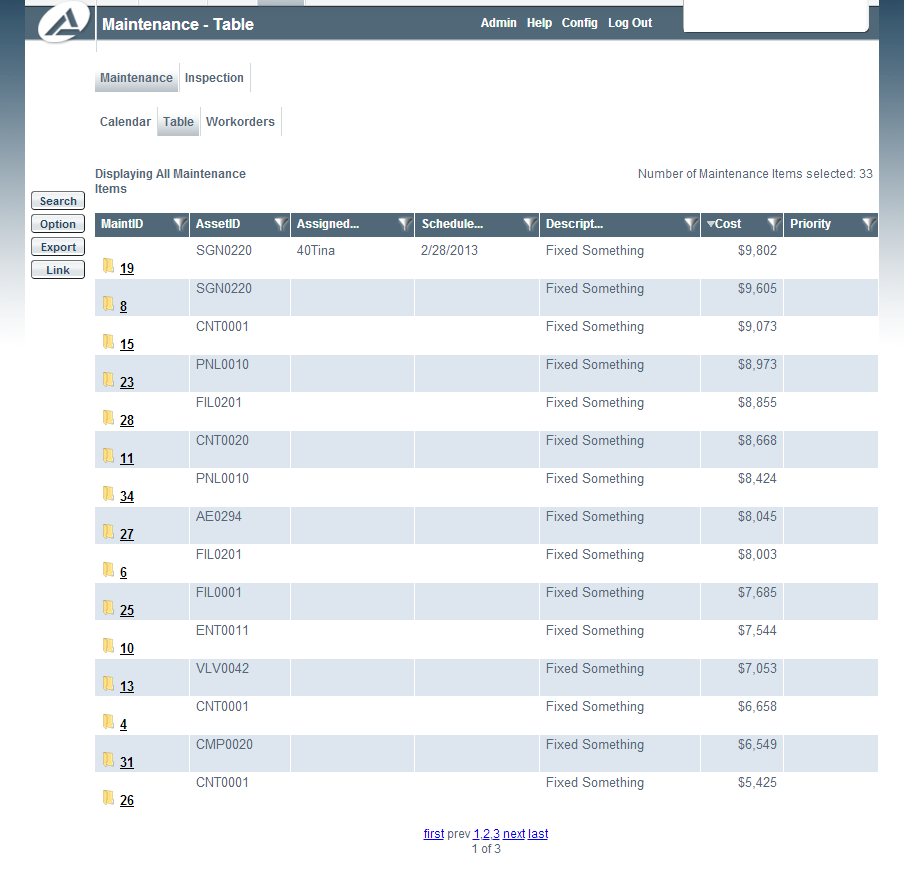
Clicking the folder icon next to the Maintenance ID will open a dialog box with the options to assign the activity to a user, schedule a date for the activity, or edit the activity. Assigning the activity to a user will cause the work order to appear in the designated user’s Maintenance / Workorders tab under the Work Screen. Scheduling a date for the activity will set the start date (or first date) for the activity and make it appear in the Maintenance / Calendar tab. The edit button allows the user to edit the initial maintenance item fields entered.
Clicking on the Maintenance ID will open a dialog box that shows the work order.